This viral AI trend is completely prompt-based. Instead of spending hours editing videos, you simply provide an AI image prompt and a matching AI video prompt. The AI handles everything automatically.
Most creators place Motu and Patlu near a highway signboard, village entrance, market road, or city landmark. The signboard usually displays the name of a village, city, district, or any custom location chosen by the user.
The best part is that you can also personalize the dialogue. You can add your village name, your friend’s name, a funny message, or even create a completely unique conversation. Because everything is AI-generated, you can easily customize every detail according to your own idea.
How To Create The Motu Patlu AI Video Editing Prompt 2026 AI Image
The first step is creating the AI image that you’ll later convert into a talking video.
Simply copy the Image Prompt provided below and paste it into ChatGPT or any AI image generator that supports detailed prompts. Before generating the image, replace the sample location, village name, city name, or dialogue with your own custom details.
Once the AI finishes generating the image, download it in the highest quality available. You’ll use this same image while creating the animated video in the next step.
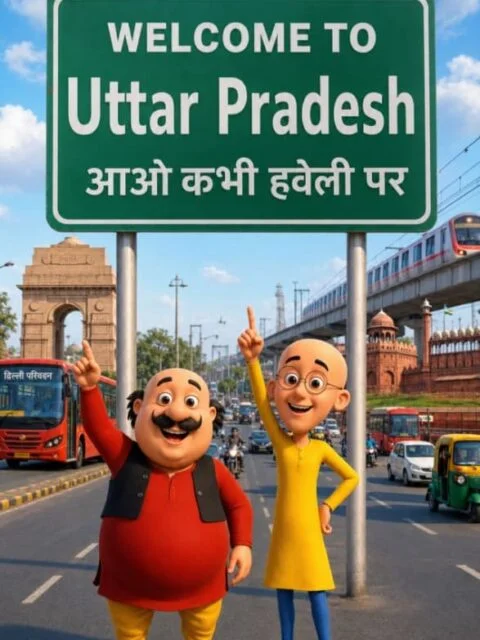
Image Prompt
Create a high-quality 3D cartoon-style scene inspired by classic Indian animation. Two funny cartoon friends stand in the middle of a wide modern Indian city road, smiling and pointing upward. The left character is a chubby man with a big black moustache, wearing a red kurta, yellow pajama, black waistcoat, and black shoes. The right character is a slim bald man with round glasses, wearing a yellow kurta, blue pants, and brown shoes, raising one finger upward. Behind them is a large green highway signboard supported by two silver poles. The signboard has a white border and bold white text exactly as follows: WELCOME TO Uttar Pradesh आओ कभी हवेली पर The text must be perfectly centered, sharp, correctly spelled, and use realistic Indian highway sign typography. Background: A busy Indian city with India Gate on the left, Red Fort on the right, a metro train on an elevated track, red city buses, auto-rickshaws, motorcycles, cars, streetlights, trees, and a bright blue sky with soft white clouds. Camera angle: Eye-level, wide-angle, centered composition. Lighting: Bright natural daylight with soft realistic shadows. Style: Ultra-detailed Pixar-quality 3D cartoon render, vibrant colors, smooth textures, cinematic lighting, depth of field, Ultra HD, 8K, highly detailed, professional animation quality. Vertical composition (9:16), realistic road markings, clean perspective, sharp focus, vibrant colors.
Video Prompt
Create a 10-second ultra-realistic 3D animated video using the uploaded image as the exact reference. Keep Motu, Patlu, their faces, clothing, colors, body proportions, poses, the green highway signboard, and the entire background exactly the same. Do not change or redesign any character or object. Animate both characters with realistic lip-sync, natural blinking, subtle facial expressions, smooth hand gestures, slight body movement, and cinematic handheld camera motion. Add realistic movement to passing vehicles, birds flying, trees gently swaying in the wind, and natural environmental motion while preserving the original composition. Motu smiles, waves his right hand toward the camera, and says in natural Indian Hindi: "हेलो दोस्तों, मैं मोटू हूँ। आज मैं उत्तर प्रदेश घूमने आया हूँ। यहाँ का माहौल बहुत बढ़िया है। आज मैं उत्तर प्रदेश का गरमा-गरम समोसा खाऊँगा।" After Motu finishes speaking, Patlu smiles, points toward the city, and says: "दोस्तों, यह शहर बहुत ही सुंदर है। अगर मौका मिले, तो यहाँ ज़रूर आइए!" Add realistic Indian highway ambience with passing cars, buses, motorcycles, birds, soft wind, distant traffic sounds, and a lively city atmosphere. Use cinematic daylight lighting, realistic shadows, smooth Pixar-quality 3D animation, ultra-detailed textures, professional facial animation, synchronized speech, shallow depth of field, 4K Ultra HD quality, vertical 9:16 aspect ratio, and highly realistic rendering.
Image Prompt
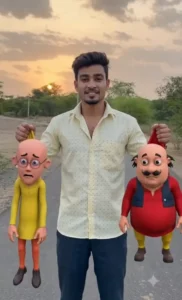
CREATE A HYPER-REALISTIC CINEMATIC IMAGE USING THE UPLOADED FACE WITHOUT CHANGING THE FACIAL FEATURES (100% FACE PRESERVATION). THE MAN IS STANDING CONFIDENTLY ON A STAIRCASE, WEARING A STYLISH DARK RED SHIRT, WHITE PANTS, AND CLEAN WHITE SNEAKERS. HE IS HOLDING MOTU IN ONE HAND AND PATLU IN THE OTHER BY THE BACKS OF THEIR SHIRTS, LIFTING THEM INTO THE AIR. MOTU AND PATLU HAVE FUNNY, SHOCKED, AND SCARED EXPRESSIONS. KEEP THEIR ORIGINAL CARTOON APPEARANCE, CLOTHES, AND PROPORTIONS. USE NATURAL DAYLIGHT, REALISTIC SHADOWS, DSLR-QUALITY DETAILS, ULTRA-HD, SHARP FOCUS, VIBRANT COLORS, AND A 9:16 VERTICAL COMPOSITION. THE MAN'S FACE MUST REMAIN EXACTLY THE SAME AS THE UPLOADED PHOTO WITH NO CHANGES.
Video Prompt
Create a 10-second ultra-realistic 3D animated video using the uploaded image as the exact reference. Keep the man's face, clothing, pose, Motu, Patlu, and the entire background exactly the same. Do not change any facial features, character design, clothes, colors, or proportions. Animate the man with realistic lip-sync, blinking, facial expressions, natural hand movements, and slight body motion while he holds Motu and Patlu in the air. Motu and Patlu should struggle slightly, move their hands and legs, blink naturally, and show funny scared expressions. The man laughs confidently and says in natural Indian Hindi: "अब नहीं आएँगे किसी के गाँव में! दोनों को पकड़ लिया मैंने। सालों ने बहुत तंग कर रखा था... हा हा हा!" After the man finishes, Motu and Patlu both look scared and speak together with emotional lip-sync: "अब हम किसी के गाँव में नहीं जाएँगे... हमें माफ़ कर दो, Roy Bhai!" Add realistic ambient sounds including light wind, birds, distant traffic, and subtle environmental noise. Use cinematic lighting, DSLR-quality depth of field, ultra-smooth animation, professional facial animation, synchronized lip movements, Ultra HD 4K quality, Pixar-quality realism, and a vertical 9:16 composition.
How To Generate The AI Vide
After your AI image is ready, it’s time to turn it into a realistic talking animation.
Copy the Video Prompt provided above and open your favorite AI video generator. Create a new project and upload the image you generated in the previous step. Paste the video prompt into the prompt box and customize the dialogue if you want to change the location, names, or conversation.
Click the Generate button and wait for a few moments while the AI processes your request. Within a short time, you’ll receive a realistic animated video where Motu and Patlu naturally speak your personalized dialogue with smooth facial expressions, lip-sync, and realistic movements.
Note: Some CapCut templates may not work in certain countries because of regional restrictions. If the template button doesn’t respond, try again later or open it through the official CapCut app. The link provided in this article opens the original CapCut template. We are not affiliated with CapCut, and all rights belong to their respective owners.
Conclusion
The Motu Patlu AI Video Editing Prompt 2026 makes it incredibly easy to create funny and viral AI videos without any editing skills. Simply generate the AI image, use the matching video prompt, and let the AI create a realistic talking animation within minutes.
If you enjoy creating trending AI content, keep visiting our website. We regularly share the latest AI prompts, image prompts, video prompts, and step-by-step tutorials to help you create unique videos for Instagram Reels, YouTube Shorts, Facebook, and other social media platforms.