If you’ve ever used Windows 7, you probably remember its clean design, classic Start Menu, and smooth desktop experience. Even years after its release, many people still consider it one of Microsoft’s best operating systems. If you want to relive that experience on your smartphone, the Win7 Simu App makes it possible.
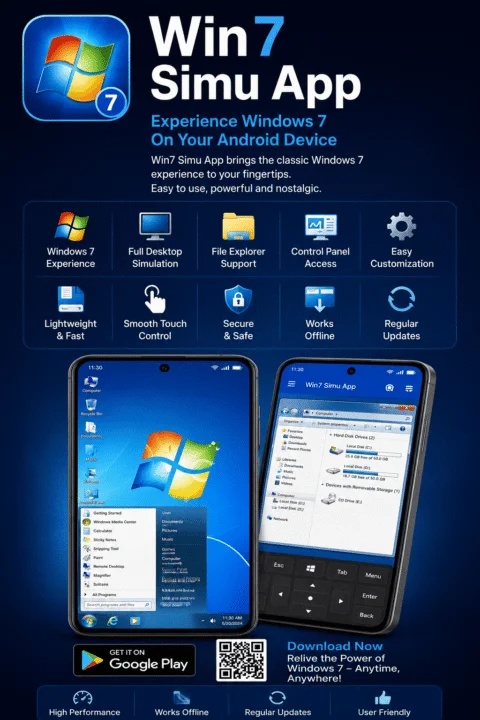
Win7 Simu is a lightweight Android application that recreates the complete Windows 7 desktop environment on your phone. From the familiar taskbar and desktop icons to the classic Start Menu and built-in system apps, everything is designed to feel just like using a real Windows 7 PC. Whether you’re a technology enthusiast or simply curious about older operating systems, this app offers a fun and interactive experience.
In this article, you’ll learn everything about the Win7 Simu App, including its features, why it’s becoming popular, how to use it, and whether it’s worth downloading.
What is the Win7 Simu App?
The Win7 Simu App is an Android application that simulates the appearance and functionality of the classic Windows 7 operating system. Instead of installing Windows on your phone, the app recreates the desktop environment with interactive animations, menus, icons, and built-in applications. Once installed, you can explore a Windows 7-style desktop, open familiar programs, browse the Start Menu, move desktop icons, and enjoy an interface that closely resembles the original operating system. Although it’s only a simulation and not a full Windows installation, the experience feels surprisingly realistic.
Why is the Win7 Simu App So Popular?
Windows 7 continues to have a loyal fan base because of its simple layout, reliable performance, and user-friendly design. Many users miss its classic interface after upgrading to newer versions of Windows. The Win7 Simu App brings back that nostalgic experience on Android devices. It lets users interact with a familiar desktop environment without needing a computer, making it popular among students, tech enthusiasts, and anyone who enjoys retro technology. Its realistic design and smooth performance have helped it gain attention across social media and app communities.
Authentic Windows 7 Desktop Experience
One of the biggest highlights of the app is its realistic desktop simulation. The interface closely matches the original Windows 7 layout, allowing users to experience familiar navigation and controls. You’ll find the classic Start Menu, desktop shortcuts, taskbar, notification area, and window animations that made Windows 7 so popular. Every element has been carefully designed to recreate the look and feel of the original operating system.
Built-In Windows Applications
The app also includes several built-in applications inspired by Windows 7. Users can open different system tools, explore classic utilities, and interact with familiar desktop programs. These applications aren’t full desktop software, but they add realism to the overall experience and make the simulation much more enjoyable.
Smooth Navigation and Interactive Features
Win7 Simu provides responsive controls that make navigating the desktop simple and enjoyable. Users can open multiple windows, move icons across the desktop, browse menus, and switch between different applications with ease. The smooth animations and interactive interface help create the feeling of using an actual Windows 7 computer instead of a mobile app.
Customization Options
The app also offers several customization features that let users personalize the simulated desktop. You can change wallpapers, organize desktop icons, and explore different interface settings while still maintaining the classic Windows 7 appearance. These small customization options make the experience feel more personal and engaging.
Lightweight and Easy to Use
Unlike many large simulation apps, Win7 Simu is designed to run smoothly on most Android smartphones. It doesn’t require powerful hardware or advanced technical knowledge. Simply install the app, launch it, and start exploring the Windows 7 desktop. The simple interface makes it suitable for beginners as well as experienced users.
Entertainment and Educational Value
Besides being entertaining, Win7 Simu also has educational value. Younger users who have never used Windows 7 can explore its interface and understand why it became one of the most successful operating systems ever released. Students and technology enthusiasts can also learn how traditional desktop operating systems were designed before modern interfaces became common.
Safe and Offline Experience
Most features of the Win7 Simu App work without an internet connection. After installing the application, users can explore the desktop, open built-in applications, and enjoy the Windows 7 simulation offline. This makes it a great option for entertainment while traveling or whenever internet access isn’t available.
Why Users Enjoy Win7 Simu
The popularity of Win7 Simu comes from its perfect combination of nostalgia and simplicity. It successfully recreates the familiar Windows 7 environment while remaining lightweight and easy to use. Whether you’re revisiting your favorite operating system or discovering it for the first time, the app offers an enjoyable experience that stands out from ordinary Android launchers.
Conclusion
The Win7 Simu App is one of the best Android applications for anyone who wants to experience the classic Windows 7 desktop again. With its authentic interface, interactive desktop environment, built-in applications, smooth animations, and offline support, it delivers a nostalgic yet enjoyable experience for users of all ages. If you’re interested in classic computer interfaces or simply want to explore a realistic Windows 7 simulation on your smartphone, Win7 Simu is definitely worth trying.
Frequently Asked Questions (FAQs)
1. What is the Win7 Simu App?
Win7 Simu is an Android application that recreates the Windows 7 desktop experience with interactive menus, icons, and built-in applications.
2. Is Win7 Simu free to use?
Yes. The app is free to download, although some versions may include optional premium features or advertisements.
3. Does the app install Windows 7 on my phone?
No. It only simulates the Windows 7 interface and does not install the actual Windows operating system.
4. Can I use the app without an internet connection?
Yes. Most of the simulation works offline after the app has been installed.
5. Is Win7 Simu safe to use?
If downloaded from a trusted source such as the Google Play Store, the app is generally safe to use.
6. Which Android devices support Win7 Simu?
The app works on most Android smartphones and tablets that meet the minimum Android version requirements.