Raksha Bandhan AI Photo Editing Prompts are a simple way to create festive brother-sister images without spending hours in Photoshop or other traditional editing software. With a suitable photo and a well-written prompt, you can create different Raksha Bandhan-themed scenes using an AI image tool. For 2026, Raksha Bandhan will be celebrated on Friday, August 28 in India. In this article, I have explained how these prompts work, how to use your own photos, and what you should check before sharing the final AI-generated image. You can also add your own ready-to-use prompts in the dedicated sections below.
What Are Raksha Bandhan AI Photo Editing Prompts?
A photo-editing prompt is simply a detailed instruction given to an AI image tool. It tells the tool what you want to create or change in an existing image. For a Raksha Bandhan photo, a prompt can describe things such as:
- Brother and sister celebrating Raksha Bandhan
- Sister tying Rakhi on her brother’s wrist
- Traditional Indian clothing
- Festive decorations
- A family celebration
- Studio-style photography
- Outdoor festive scenes
- Cinematic lighting
- Natural facial expressions
A detailed prompt generally gives the AI more information about the desired composition. However, the final result can still vary depending on the image tool and the uploaded photograph.
Raksha Bandhan AI Photo Prompt Collection
If you are looking for ready-made prompts, you can add your own prompts in the sections below.
1. Brother-Sister Raksha Bandhan AI Prompt
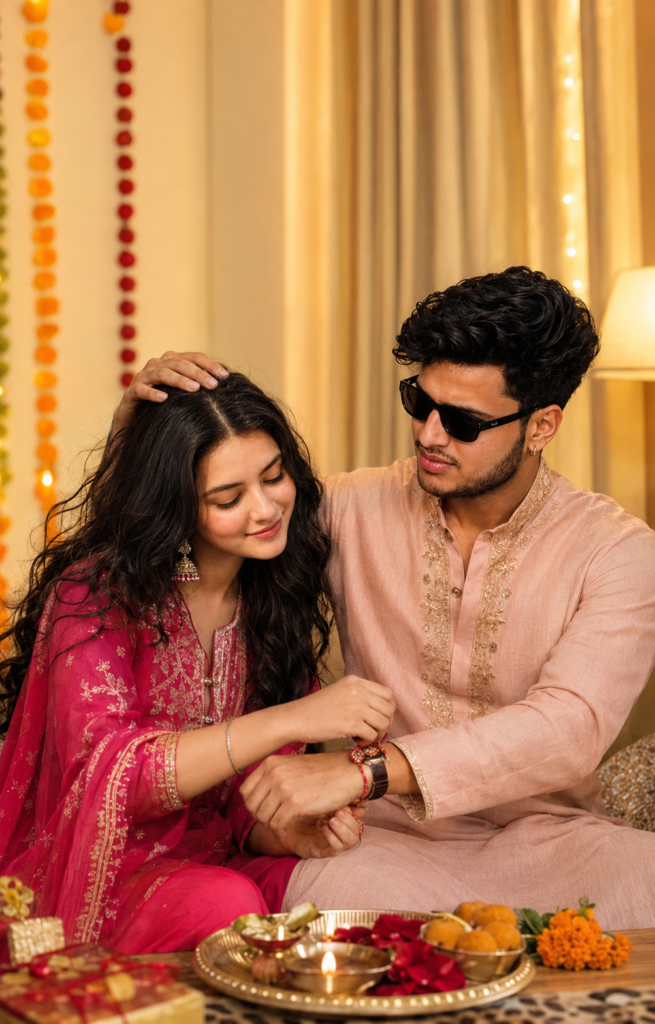
2. Sister Tying Rakhi AI Photo Prompt
This style focuses on the main Raksha Bandhan ritual, where the sister ties Rakhi on her brother’s wrist.
How to Create a Raksha Bandhan AI Photo
Creating an AI photo does not necessarily require advanced photo-editing skills. The exact interface depends on the AI tool you use.
Step 1: Choose Your Photo
Start with a clear photograph of yourself, your brother, sister, or family members. A well-lit image with clearly visible faces is usually a better starting point than a heavily blurred or compressed photograph.
Step 2: Open an AI Image Tool
Open the AI image-generation or editing tool you want to use. For example, ChatGPT currently supports both creating new images and editing uploaded images through natural-language instructions.
Step 3: Upload Your Photo
If the tool supports image editing, upload your selected photograph. Make sure you are comfortable with the privacy and sharing settings of the service you are using.
Step 4: Add Your Prompt
Choose one of the prompt sections above and add your own prompt in the indicated space. Explain clearly what you want to change and what should remain unchanged. For example, if preserving a person’s appearance is important, your prompt can specifically describe which facial and visual characteristics should remain consistent.
Step 5: Generate the Image
Submit the instructions and wait for the image to be generated. Some results may require more than one attempt.
Step 6: Check the Final Image
Don’t immediately publish the first result.
Carefully check:
- Facial appearance
- Hands and fingers
- Rakhi placement
- Clothing
- Background
- Text inside the image
- Unwanted objects
- Overall realism
If something looks incorrect, ask the AI tool to correct that particular part
How to Get Better Results From Raksha Bandhan AI Prompts
The prompt is important, but the source photograph also makes a difference.
Use a Clear Photo
Avoid extremely blurry, dark, or heavily compressed photographs.
A clear image gives the editing tool better visual information about the subjects.
Describe the Scene Clearly
Instead of simply writing “make a Raksha Bandhan photo,” explain the important details.
Mention the:
- People
- Pose
- Clothing
- Background
- Lighting
- Mood
- Photography style
This gives the AI a clearer direction.
Don’t Overload the Prompt
Adding dozens of unrelated instructions can make the result less consistent. Start with the main scene and then add important visual details.
Check Facial Details
AI editing can sometimes alter facial features. If maintaining the person’s recognizable appearance is important, specifically mention that the facial characteristics should remain consistent. Even then, you should always review the final result.
Check Hands Carefully
Raksha Bandhan images often show the sister tying a Rakhi around the brother’s wrist. Because hands are an important part of the scene, inspect the fingers and Rakhi placement before publishing.
Can You Use Your Own Brother or Sister’s Photo?
Yes, provided the AI tool supports image uploads and editing. However, you should have appropriate permission before uploading or publicly sharing another person’s photograph. This is especially important if the edited image significantly changes the person’s appearance or is going to be published publicly
Can ChatGPT Create Raksha Bandhan AI Photos?
Yes. ChatGPT supports image generation and editing. You can create an image from a text description or upload an existing image and describe the changes you want. For existing photos, clear instructions about what should change and what should stay the same can help guide the edit. OpenAI’s current guidance also recommends making image-editing instructions explicit when you want particular elements preserved.
Learn more about creating and editing images with ChatGP
Why Does the AI Change My Face?
AI image editing does not always preserve every detail of an uploaded photograph perfectly.
You may notice changes to:
- Face shape
- Hair
- Skin details
- Clothing
- Hands
- Accessories
- Background
If that happens, try a clearer source image and provide more specific instructions about what should remain unchanged.
You can also ask for a targeted correction instead of regenerating the complete image
How to Make a Raksha Bandhan Photo Look Natural
A realistic image usually benefits from simple and consistent instructions. Avoid adding too many artificial effects. Instead, focus on realistic lighting, natural expressions, appropriate clothing, and a believable background. You should also inspect the generated image at full size before downloading or sharing it. This is particularly important when the image contains multiple people.
Where Can You Use Raksha Bandhan AI Photos?
Once you are satisfied with the result, you can use your personal AI-created image for platforms such as:
- WhatsApp Status
- Personal greetings
- Family posts
- Digital Raksha Bandhan cards
For Stories and Status updates, a vertical composition can be more suitable. For regular social-media posts, choose the aspect ratio that fits your intended platform.
Frequently Asked Questions
What are Raksha Bandhan AI Photo Editing Prompts?
They are detailed instructions that tell an AI image tool how to create or modify a Raksha Bandhan-themed image.
Can I use my own brother or sister’s photo?
Yes, if the AI tool supports image editing. Make sure you have the appropriate permission to use and share another person’s photograph.
Can AI create a realistic Raksha Bandhan photo?
Yes, AI image tools can create realistic festive images, but the quality varies depending on the tool, prompt, and source image.
How can I improve the face in an AI-generated photo?
Use a clear source image and explicitly explain which facial characteristics should remain consistent. You may also need to regenerate or refine the result.
Why do AI-generated hands sometimes look incorrect?
AI image generation can occasionally produce inaccurate fingers or hand positions. Always inspect the hands, especially in Raksha Bandhan images where the Rakhi ceremony involves close interaction between the hands.
Can I create a Raksha Bandhan image without Photoshop?
Yes. Modern AI image tools can handle many image-generation and editing tasks without requiring traditional photo-editing software. ChatGPT, for example, supports image creation and editing through natural-language instructions.
Can I create different Raksha Bandhan photo styles?
Yes. You can create traditional, emotional, cinematic, studio, outdoor, modern, and family-themed versions by changing the instructions in your prompt.
Final Words
These Raksha Bandhan AI Photo Editing Prompts can help you create personalized festive images from your own photographs without relying on complicated editing software. The important thing is to start with a good-quality photo, describe your desired scene clearly, and carefully review the generated result. Don’t assume that every AI-generated image will be perfect on the first attempt. Facial details, hands, clothing, and background elements may sometimes need correction. For Raksha Bandhan 2026, which falls on August 28, you can use these ideas to create a personal family portrait, festive greeting, social-media post, or digital memory.